
26.1.20

Fix Blurry Windows 10 Fonts

Here is a handy utility you can use to correct the problem  called XPExplorer – Windows 10 DPI Fix, and it’s free.
Start it up and check the Use Windows 8.1 DPI Scaling  option and then choose your scaling level.
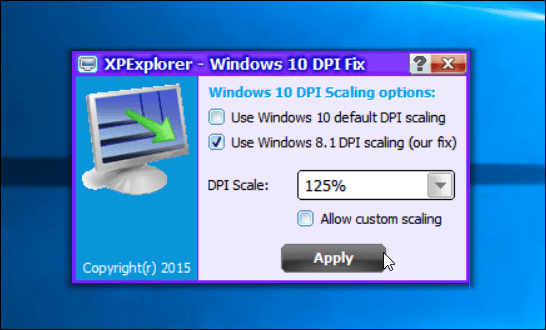
set to 125
A restart is required to complete the installation. When you get back fonts in the apps you were having issues with, they should no longer be fuzzy, but clean and clear again.
This utility is nice to have because it will work across the board and you won’t need to use the manual method for fixing everything that has fuzzy/blurry text.

15.12.19

Remove yellow/blue sheild icon from shortcuts

After upgrading to Windows 10, some desktop shortcuts have UAC shield icons. 

Remove yellow/blue sheild icon from shortcuts-untitled-1.png

  1. Right-click the shortcut to Properties
  2. Click Change Icon, then click OK when its window pops up (necessary step to avoid losing the icon)
  3. Add the following, plus a space, to the beginning of the Target field, leaving the existing path at the end:
    Code:
    cmd /c start ""

12.11.19

OpenDNS's FamilyShield


  • Update your routers DNS adresses with OpenDNS's FamilyShield nameservers to get free content filtering:
  • 208.67.222.123
  • 208.67.220.123
  • read more at https://www.opendns.com/home-internet-security/

6.7.19

Recover deleted items in Outlook Web App 2013


1. Log on to your mailbox using OWA 
2. Right-click on Deleted Items and select recover deleted items.
3. In the recover deleted items window, check the emails you would like to recover, and click recover4. A message indicates where the items will be recovered. 


22.3.18

Solving “Calendar sharing is not available with the following entries because of permission settings on your network”

Instead of typing in the user’s name in the To: field, click the To: button and select their Exchange address from the Global Address List.